
 Back to Blog
Today, we’re excited to announce the open-source release of NesterConversationalBot — our production-tested framework for building voice-first AI applications. After months of refinement across real-world deployments, we’re making this available to the community.
Why Another Voice Framework?
Most existing voice AI solutions fall into two categories: either overly simplistic (think basic IVR systems) or prohibitively complex enterprise platforms. We built NesterConversationalBot to fill the gap — a framework that’s production-ready yet accessible.
The key differentiator: ~1-1.5 second response times for complete voice interactions, including speech recognition, LLM reasoning, and speech synthesis. This isn’t a demo metric — it’s what we achieve in production with real users.
Core Architecture
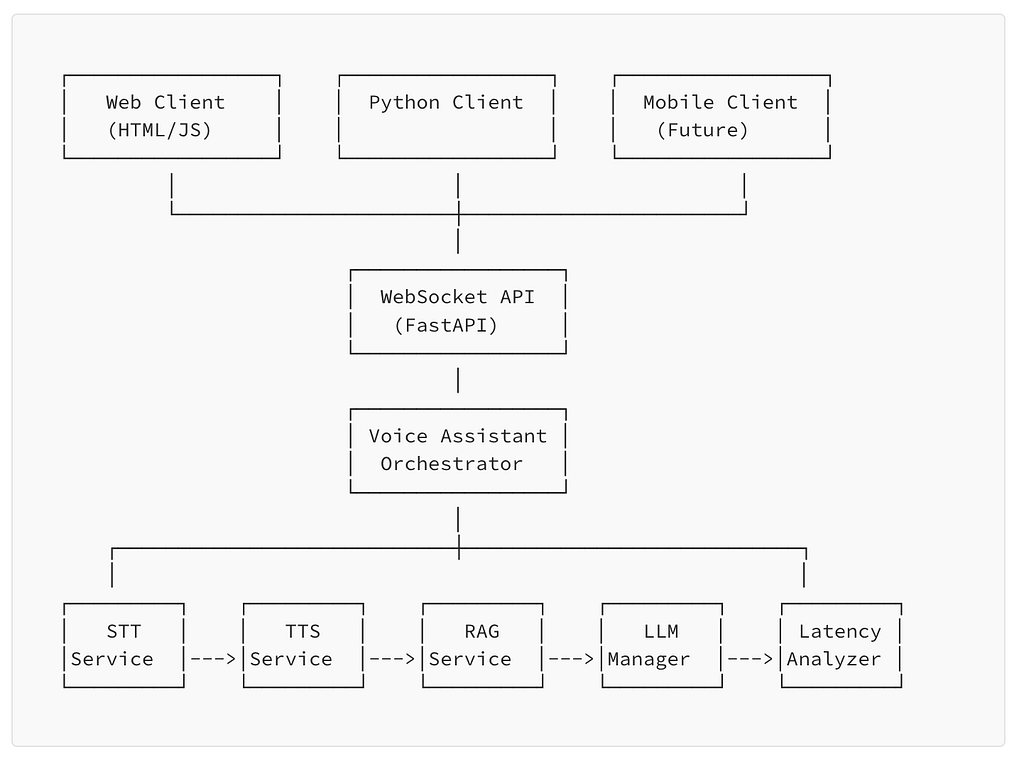
NesterConversationalBot is built on four tightly integrated components, each optimized for its specific role in the voice pipeline.
1. Speech-to-Text (STT)
The system streams audio in chunks and outputs both partial and final transcription results. This streaming approach is crucial — we don’t wait for complete utterances before starting processing.
Primary providers:
- Deepgram: Our default choice for production deployments (sub-300ms latency)
- OpenAI Whisper: Higher accuracy for complex audio, slightly higher latency
Additional providers supported via Pipecat integration: AWS Transcribe, Azure Speech, Google Cloud Speech.
2. LLM Integration & Conversation Management
At the heart of the system is a ConversationManager that handles:
- Session state persistence across turns
- Context window management for long conversations
- Tool/function invocation coordination
- Memory retrieval from vector stores
The architecture enables bots that reason and act, not just respond. When a user asks “What’s my appointment tomorrow?”, the system doesn’t just generate text — it calls the calendar API, processes the result, and formulates a natural response.
3. Function Calling & RAG Integration
Voice interactions often require real-time data: checking inventory, looking up customer records, querying knowledge bases. NesterConversationalBot includes first-class support for:
- Dynamic tool invocation: Database queries, API calls, and custom functions execute mid-conversation
- RAG (Retrieval-Augmented Generation): Semantic search against document stores for context-aware responses
- Streaming function results: Long-running operations don’t block the conversation
The critical insight: tools must be used selectively and strategically. Every function call adds latency. Our framework includes intelligent routing that only invokes tools when necessary, maintaining the sub-1.5 second target.
4. Text-to-Speech (TTS)
For synthesis, we selected ElevenLabs as the primary provider based on three criteria:
- Voice quality: Natural-sounding output across different speaking styles
- Indian voice support: Critical for our multilingual deployments
- Streaming capability: Audio generation begins before the full response is complete
- Emotion modeling: Built-in support for tone variation
Key Features
Real-Time Voice Streaming
The entire pipeline operates in streaming mode. Audio flows from the user’s microphone → STT → LLM → TTS → speaker in a continuous stream. There’s no “processing...” pause that plagues traditional voice systems.
Modular LLM Execution
Swap LLM providers without changing your application logic. The framework supports:
- OpenAI GPT-4 / GPT-4o
- Anthropic Claude
- Google Gemini
- Local models via Ollama
Multilingual Support
Built-in support for multilingual conversations, including code-switching. Users can seamlessly switch between English and Hindi (Hinglish) within the same conversation — the system handles it transparently.
Performance Monitoring
Production voice systems need observability. The framework includes built-in metrics for:
- End-to-end latency per turn
- STT/LLM/TTS latency breakdown
- Tool invocation timing
- Conversation session analytics
Getting Started
Getting up and running takes minutes:
# Clone the repository
git clone https://github.com/nesterlabs-ai/NesterConversationalBot.git
cd NesterConversationalBot

# Install dependencies
pip install -r requirements.txt

# Configure your API keys
cp env.example .env
# Edit .env with your Deepgram, OpenAI, and ElevenLabs keys

# Start the WebSocket server
python websocket_server.py
The server exposes a WebSocket endpoint that accepts audio streams and returns synthesized responses. Connect any frontend — web, mobile, or embedded devices.
Architecture Deep Dive
For teams building production systems, here’s how the components interact:
The Pipeline Flow
- Audio Input: WebSocket receives audio chunks (16kHz, 16-bit PCM)
- Streaming STT: Deepgram processes chunks, emitting partial transcripts
- Intent Detection: On utterance completion, the ConversationManager determines required actions
- Tool Execution: If needed, functions execute in parallel where possible
- LLM Generation: Response generation begins with all context assembled
- Streaming TTS: Audio synthesis starts immediately, streaming back to the client
Latency Optimization Techniques
Achieving sub-1.5 second latency required specific optimizations:
- Speculative execution: Start likely tool calls before the utterance completes
- Response chunking: Begin TTS on the first sentence while generating the rest
- Connection pooling: Maintain warm connections to all external services
- Intelligent caching: Cache frequent queries and tool results
Use Cases
NesterConversationalBot powers several production deployments:
- Healthcare intake: Patient scheduling and information collection
- Customer support: Technical troubleshooting with knowledge base integration
- Sales assistance: Product recommendations with CRM integration
- Internal tools: Voice interfaces for enterprise applications
Enterprise Support
The open-source framework covers most use cases, but enterprise deployments often need additional capabilities:
- Custom voice cloning and branding
- On-premise deployment options
- Advanced analytics and compliance logging
- SLA-backed support
Contact our team for enterprise licensing and support options.
What’s Next
This release is v1.0, but development continues. On the roadmap:
- Emotion detection: Real-time sentiment analysis for adaptive responses
- Multi-party conversations: Support for conference-style interactions
- Visual context: Integration with vision models for multi-modal interactions
- Edge deployment: Optimized builds for on-device inference
Contributing
We welcome contributions from the community. Whether it’s bug fixes, new features, or documentation improvements, check out our GitHub repository to get started.